Heavy images
An image over 250 KB on a page is weight the visitor pays for and the crawler has to fetch. The study found at least one such image on 45% of 963 stores, across 19,127 pages read. Shopify led that finding, 50% of 713 stores, against 29% of 250 stores on WooCommerce.
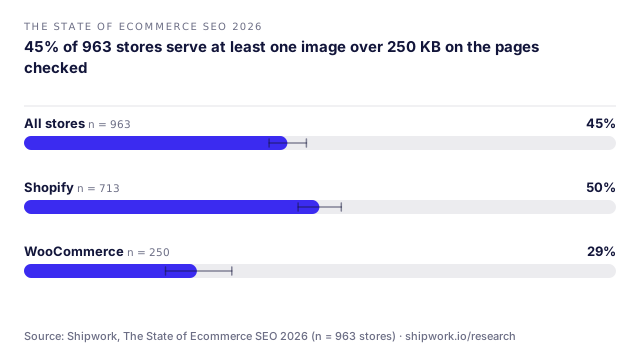
The chart comes from The State of Ecommerce SEO 2026. Weight is not only a speed problem. A hero image far larger than the space it fills delays the largest contentful paint, and the Core Web Vitals guide explains how that interacts with the rest of the page. Resizing and compressing the few images above the fold is usually the cheapest fix available.
Two details make the number easier to use. The first is that the study counted at least one image over the threshold on a page, so a store with a single oversized banner lands in the same group as a store with a hundred heavy files; the finding is about presence, not volume. The second is that weight is measured as the page is served, so it reflects what a browser actually downloads rather than what sits in the media library. A theme that requests a large size and scales it down in the browser still ships the large bytes. Open one product page, check the size the main image is requested at, and compare it with the size it is displayed at.
Legacy formats
Serving images only in older formats, with no WebP or AVIF, means every visitor downloads more bytes for the same picture. These formats compress a photograph to a fraction of the equivalent older file with no visible loss at the sizes a store displays. The study found legacy-only delivery on 41% of 963 stores. Here the order flips: WooCommerce was higher, 48% of 250 stores, than Shopify, 39% of 713 stores. A managed platform can convert and resize images on its own delivery network by default, while a self-run store has to install and configure that. It is the same split the platform comparison shows on crawl and delivery checks.
Format delivery is worth verifying rather than assuming. A theme may advertise modern formats while serving the original to browsers it does not recognise, or a plugin may convert only images uploaded after it was installed. The reliable test is the one the check runs: request the page from outside and read the format of the images it returns. If the response is an older format, the optimisation is not reaching the page that matters, whatever the settings screen says.
Missing alt text
Alt text describes an image when it cannot be seen. It serves shoppers using assistive technology, and it is the only way a search system understands an image whose file name is a number. The study found images with no alt text on 48% of 963 stores, and the two platforms were close: 49% of 713 stores on Shopify and 46% of 250 stores on WooCommerce. That closeness is the point. This is not something a platform decides, it is left to whoever adds the image.
Good alt text is short and specific: the product name and the angle, such as a boot in brown leather seen from the side. Bad alt text repeats keywords, or describes the file, or says nothing at all. Decorative images and spacer graphics should carry an empty alt so a screen reader skips them rather than reading a file name aloud. On a product gallery, the main image and each variation image each need their own description, because a shopper who cannot see the gallery cannot tell the variants apart.
Fixing it on Shopify and WooCommerce
On Shopify, the delivery layer already produces responsive sizes and modern formats for many themes, so the common failures are at the input. Upload a sensibly sized original instead of a camera-sized file, let the theme request the size it displays, set explicit width and height so the layout does not shift, and mark the one image above the fold as the priority while the rest load lazily. A theme that hard-codes a single large size is the usual source of a heavy hero, and the fix is to request the size the layout actually uses. Alt text lives on each image on the product page. Write what the image shows, not a list of keywords.
On WooCommerce, the store generates several thumbnail sizes, so changing those sizes means regenerating them, and an optimisation layer should convert to modern formats and serve the right size. Remove the sizes the theme never uses. Alt text is set on each media item and on gallery images, and a product gallery often carries images with none. Neither platform writes honest alt text for you, and on both, an image with no alt text is incomplete for shoppers and for search.
For the product page as a whole, the fields around the image live in structured data. See product schema on Shopify and the structured data check for the image field and the rest of the Product block.
A short routine works on either platform, and the order matters because the first step changes the most bytes:
- Check the main product image at the size the page displays it, not the size it was uploaded at.
- Re-export the heaviest few as the right dimensions before uploading, so the platform starts from a smaller original.
- Confirm the page is served in a modern format, not only the media library.
- Set width and height on every product and gallery image so the layout does not jump while images load.
- Prioritise the one above-the-fold image and let the rest load lazily.
- Write alt text for the main image and each variation, and leave decorative images with an empty alt.
What the check measures and its limits
The image weight check fetches a page from outside the network and reports the images over the threshold, with their formats and sizes. The image check covers the same images for missing alt text. Both read a sample of pages, not the whole catalogue, and the bytes a visitor receives can differ from the original once a platform converts it, so treat the numbers as a strong signal rather than a complete bill.
Neither check is a file-size audit of your media library, and neither can judge whether an image is worth its weight. A large, detailed photograph of a product is often the right choice, and the fix is to serve it at the size the page shows, not to remove it. The finding is a prompt to inspect one page, not a verdict on the catalogue. Run it against the pages that earn the most traffic first, because the same bytes cost more on a page that gets more visits.
The study is one crawl on one date, from outside the store. Use the check on your own store to see which images are heavy on the pages that matter, then fix the largest few first. The same sample is rendered on the statistics page.
Shipwork fetches your pages from outside your network and reports the heaviest images, their formats and the pages carrying them. Free, no account, no signup. Paste your store address.
Check my image weightQuestions
What counts as a heavy image?
Do WebP and AVIF really matter?
Is missing alt text an SEO problem or an accessibility one?
Will the platform optimise my images automatically?
Does a heavy image really affect a store?
Keep reading